- Home Page /
- Musical Instruments /
- Studio Recording Equipment /
- Computer Recording Equipment /
- Computer Recording Audio Interfaces /
- Mackie Onyx Producer Audio Interface For Zoom...
0 ratings





Item #:
115168364
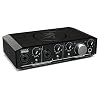
Mackie Onyx Producer Audio Interface For Zoom Video Conference Live Streaming
Item #:
115168364
ISK 18126
Price Details
Excluding Shipping & Custom charges ( Shipping and custom charges will be calculated on checkout )
*All items will import from US
0 ratings
Write a review
In stock
 Imported from USA store
QTY:
Only 10 items left in stock.
Order now and get it around Tuesday, June 30
Secured transaction
Ubuy works hard to protect your security and privacy. Our advanced payment security system ensures confidentiality by encrypting your information during transmission using AES (Advanced Encryption Standards) and SSL (Secure Socket Layer) protocols. Your payment details are 100% secure as we do not share your payment details with third party sellers.
Our Top Logistics Partners


With the Onyx Producer 22, you have the power to capture your performance and experience media with pristine fidelity at home or on the go.

Fast
Shipping

Free
Return*

Secure Packaging

100% Original Products

PCI DSS Compliance

ISO 27001 Certified


Note: Step Down Voltage Transformer required for using electronics products of US store (110-120). Recommended power converters Buy Now.


What Stands Out
High-Quality Audio
Experience professional-grade sound clarity with the Onyx preamps, ensuring your audio stands out during Zoom calls and live streams, elevating your audio quality significantly over built-in options.
Multiple Inputs
With various input options, the Onyx Producer allows seamless integration of multiple microphones and instruments, catering to diverse streaming setups and enhancing versatility for content creators.
USB Connectivity
Easily connect to computers via USB, providing a plug-and-play experience for quick setup and compatibility with major streaming software, streamlining the audio interface integration process.
Product Details
- Mackie Onyx Producer 2.2 2x2 USB Audio MIDI Recording Studio Interface. Boutique-quality Onyx mic preamp with class-leading fidelity and dynamic range. 48v Phantom Power for use with studio condenser mics. 1/4" TRS input with Hi-Z switch for connecting guitar, bass, and more. High-resolution 2 in x 2 out 24-Bit/192kHz recording. Zero-latency direct analog monitoring of inputs. Dedicated outputs for connecting studio monitors. MIDI I/O for connecting synths, controllers and more
- Bus-powered for easy mobile recording. USB 2.0 connectivity. Built-Like-A-Tank design to survive day-to-day abuse. Powerful headphone output. Tracktion Music Production Software + DAW Essentials Collection Plug-Ins Included. 16 plug-ins including Equalizer, Compressor, Reverber8, Limiter, Auto Filter, and more. Plug-ins compatible with all DAWs (AAX/AU/VST/LinuxVST). Compatible with all major DAWs on Mac or PC. 1.35 lbs / .68 kg. 23 Included Plugins:
- Avid 304E EQ - Add musical warmth with a legendary treble and bass equalizer with sweepable mid control. Avid 304C Compressor - Tweak the clarity, balance, and rhythmic feel of music with this photo optical compressor. BBD Delay - Create delay, chorus, and vibrato effects based on the Electro-Harmonix Deluxe Memory Man*. Black Op Distortion - Add rich distortion based on the Pro Co Rat* pedal. Black Shiny Wah - Achieve the famous classic tones of the VOX V846* pedal
- Black Spring Reverb - Get the twang and space of the blackface-era Fender Spring Reverb units*. C1 Chorus - Get the unmistakable sounds of the Boss CE-1 Chorus* with this emulator. DC Distortion - Dial up a range of overdriven tones with this Avid custom distortion effect. Eleven Lite - Get the sound of popular guitar amps and speaker cabinets. Flanger - Create unique sounds with this homage to vintage and modern flangers. Graphic EQ - Sculpt frequencies with ease
- Gray Compressor - Add warmth to tracks based on the gray-colored Ross* compressor. Green JRC Overdrive - Get the coveted sounds of the Ibanez TS-808 Tube Screamer*. In-Tune - Keep your instruments in tune with this digital tuner. Orange Phaser - Create interesting effects with this phase shifter based on the MXR Phase 90*. Roto Speaker - Re-create the sounds of a Leslie* rotary speaker cabinet. Sci-Fi - Add analog synth-type ring and frequency modulation
| Compatible Devices | Personal Computer, MIDI Controllers, Synthesizers, Microphones, Electric Guitars, Tablets |
| Supported Software | Tracktion Music Production Software + DAW Essentials Collection Plug-Ins |
| Connectivity Technology | USB |
| Number of Channels | 4 |
| Frequency Response | 192000 Hz |
| Operating System | Windows, macOS |
| Audio Input | XLR, TRS, USB |
| Maximum Sample Rate | 192 KHz |
| Brand Name | Audiosavings |
| Manufacturer | Mackie |
| Manufacturer Part Number | Onyx Producer 2.2 Zoom-AM |
| Model Number | Onyx Producer 2.2 Zoom-AM |
| Brand | Audiosavings |
| Item Weight | 1.5 lbs (680 grams) |
Who Should Buy?

-
Content Creators
Ideal for podcasters and YouTubers needing high-quality audio and simple integration for live streaming sessions.
-
Remote Workers
Perfect for professionals requiring excellent sound quality for video conferencing and online meetings from home.
-
Musicians
Great for musicians who perform live or record themselves while needing clear audio for streaming or band practices.

-
Casual Users
Not suited for users seeking simple plug-and-play audio solutions without the need for advanced features.
-
Budget Shoppers
It's relatively expensive compared to basic audio interfaces, making it less ideal for those with tight budgets.
-
Mobile Users
Not ideal for those needing highly portable audio interfaces, as it requires external power and setup.
Product Description
Have any Query? Chat with us
Customer Questions & Answers
-
Question:
What is the Mackie Onyx Producer Audio Interface best used for?
Answer: The Mackie Onyx Producer Audio Interface is designed primarily for high-quality audio recording and streaming. It excels in live streaming environments, making it an ideal choice for Zoom video conferences, podcasts, and music production. Its combination of premium analog input and convenient USB connectivity allows users to capture professional-grade sound effortlessly. Musicians can perform with clarity, while presenters can ensure their voice is crisp and clear during meetings. -
Question:
How does the Onyx mic preamp enhance my audio quality?
Answer: The Onyx mic preamp built into the Mackie Onyx Producer enhances audio quality significantly by providing clean gain and a broad frequency response. This results in rich, detailed sound reproduction without unwanted noise, making it perfect for professional applications. Whether you're speaking in a video call or recording vocals for a track, the preamp ensures that your audio stands out. Users often notice increased clarity and warmth in their recordings, elevating the overall production quality. -
Question:
Can I use the Mackie Onyx Producer with both Mac and Windows systems?
Answer: Yes, the Mackie Onyx Producer Audio Interface is compatible with both Mac and Windows operating systems, making it a versatile choice for various users. It offers plug-and-play functionality, requiring no complex setup, allowing you to start recording or streaming quickly. This flexibility means that whether you are a PC gamer, musician, or content creator on a Mac, you'll enjoy seamless performance without compatibility issues. -
Question:
What makes this audio interface suitable for live streaming?
Answer: The Mackie Onyx Producer is well-suited for live streaming due to its low-latency performance and high-quality audio input options. Its capability to mix multiple audio sources smoothly ensures that every aspect of your stream, from vocals to music, comes through with clarity. Additionally, its compact design allows it to be easily integrated into any home studio or remote setup, making it a favorite among streamers and content creators alike. -
Question:
Does the Mackie Onyx Producer come with software for recording?
Answer: Yes, the Mackie Onyx Producer Audio Interface typically includes a software bundle featuring popular DAWs (Digital Audio Workstations) and plugins, which enhances your recording and editing capabilities. This software allows you to produce high-quality content right out of the box, whether it’s for music or voiceover work. For users who are starting their recording journey, having access to professional-grade software can significantly streamline the learning process. -
Question:
What connectivity options does the Onyx Producer provide?
Answer: The Mackie Onyx Producer offers a range of connectivity options including USB, XLR inputs, and TRS outputs. This versatility ensures that you can connect a variety of audio sources like microphones, instruments, and external monitors. Such connections make it easy to integrate the interface into your existing setup, whether for streaming, recording, or sound mixing. Users benefit from various configurations tailored to their specific audio needs. -
Question:
Is the Mackie Onyx Producer suitable for beginners?
Answer: Absolutely! The Mackie Onyx Producer is highly regarded for its user-friendly interface and straightforward setup, making it ideal for beginners. Its intuitive controls and clear layout mean that novice users can easily navigate through settings without feeling overwhelmed. This accessibility allows newcomers to focus on creating high-quality audio without getting bogged down by technical complexities, making it approachable for anyone starting their audio journey. -
Question:
Can I use the Onyx Producer for recording music as well as video?
Answer: Yes, the Mackie Onyx Producer is versatile enough to be used for both music recording and video applications such as live streaming. Musicians can plug in their instruments or vocals while content creators can effectively capture audio for video projects. This dual functionality makes it a popular choice among users who work across different mediums, ensuring that they have a reliable interface regardless of their specific needs. -
Question:
What types of microphones work best with the Onyx Producer?
Answer: The Mackie Onyx Producer is compatible with a variety of microphones, including dynamic and condenser mics. Its XLR inputs and quality preamps ensure that both types deliver exceptional sound. For streaming or recording vocals, using a condenser mic can capture the nuances of the voice due to its sensitivity, while dynamic mics are great for instruments or live environments. This versatility allows users to choose the perfect microphone based on their recording context. -
Question:
Where can I buy the Mackie Onyx Producer Audio Interface for Zoom Video Conference Live Streaming in Iceland?
Answer: You can purchase the Mackie Onyx Producer Audio Interface for Zoom Video Conference Live Streaming at Ubuy. Ubuy offers a wide selection of electronic products and ensures that you receive quality service while shopping. Whether you are enhancing your audio setup for work or personal projects, Ubuy provides a convenient platform to find the interface that meets your audio needs.
Audiosavings Audio Interfaces Onyx Producer 2.2 Zoom-AM Editorial Review
No editorial reviews found
Customer Reviews & Ratings
1 customers ratings
-
5 Star
100%
-
4 Star
0%
-
3 Star
0%
-
2 Star
0%
-
1 Star
0%
Review this product
Share your thoughts with other customers
Pros
- High audio quality
- Easy to set up
- Compatible with multiple devices
- Durable design
- Low latency performance
Cons
- Some might find it slightly bulky.
Product Price History
Important information
- Limitations : For products shipped internationally, please note that any manufacturer warranty may not be valid; manufacturer service options may not be available; product manuals, instructions, and safety warnings may not be in destination country languages; the products (and accompanying materials) may not be designed in accordance with destination country standards, specifications, and labeling requirements; and the products may not conform to destination country voltage and other electrical standards (requiring use of an adapter or converter if appropriate). The recipient is responsible for assuring that the product can be lawfully imported to the destination country. When ordering from Ubuy or its affiliates, the recipient is the importer of record and must comply with all laws and regulations of the destination country.
- Not all the products listed on Ubuy are for sale, as Ubuy is a global search engine. Products are subject to export/trade regulations.
ISK 18126
Order now and get it around Tuesday, June 30
This item is not restrict in my country.(Please click on above link if this item is not restrict in your country, So our team will review and allow.)
QTY:
Only 10 items left in stock.
Secured transaction
Ubuy works hard to protect your security and privacy. Our advanced payment security system ensures confidentiality by encrypting your information during transmission using AES (Advanced Encryption Standards) and SSL (Secure Socket Layer) protocols. Your payment details are 100% secure as we do not share your payment details with third party sellers.
Our Top Logistics Partners
Fastest cross-border delivery
Features & Benefits
- High-resolution 24-bit/192kHz converters for superior sound quality.
- Built-Like-A-Tank design ensures durability for mobile recording.
- Includes boutique-quality Onyx mic preamp for unmatched fidelity.
- Zero-latency direct analog monitoring for real-time listening.
- MIDI I/O for connecting synths and controllers easily.
- Comes with 23 bundled plugins for versatile sound creation.